Secure OpenClaw for Teams Without DevOps: Managed vs Self Hosted
2026-09-06

Most teams should host OpenClaw on a managed platform if the goal is an always-on assistant without DevOps overhead. If you need full control over data locality, custom integrations, or budget flexibility, self-host on a hardened VPS or Kubernetes cluster instead. Running OpenClaw on a laptop is fine for testing, never for production.
***
> TL;DR:
>
> - Managed hosting is ideal for teams seeking hassle-free operation with strong security defaults, while self-hosting offers full control but requires ongoing maintenance and security hardening.
> - Docker Compose is the recommended installation method for production, with pinning specific release tags to prevent breaking changes from updates.
> - Security best practices for VPS deployment include binding to localhost, enforcing tokens, sandboxing tools, restricting SSH access, and setting budget caps on API usage.
> - A minimum of 2 CPU and 4GB RAM is recommended for hosting OpenClaw, with a swap file advised to prevent outages during traffic spikes.
> - Scaling effectively involves vertical upgrades for resources and using cloud workers for heavy or burst compute tasks, keeping the Gateway core small and predictable.
***
Table of Contents
- Host OpenClaw: three approaches and who each one fits
- Quickstart install paths: Docker, systemd, and Kubernetes
- Security and hardening checklist for a public VPS
- How much server do you actually need?
- When to offload work to cloud workers
- Maintenance, backups, and what things actually cost
- Monitoring and logging setup for OpenClaw hosting
- Scaling strategies once one server isn't enough
- Data privacy and compliance when hosting OpenClaw
- Why managed hosting is the pragmatic default for most teams
- Get OpenClaw running today without touching a terminal
- Where to go next for official docs and setup guides
- Sources
Host OpenClaw: three approaches and who each one fits
We've watched enough OpenClaw deployments go sideways to know the decision usually comes down to one question: how much operational risk are you willing to own? There are three real paths, and each one trades convenience for control at a different rate.
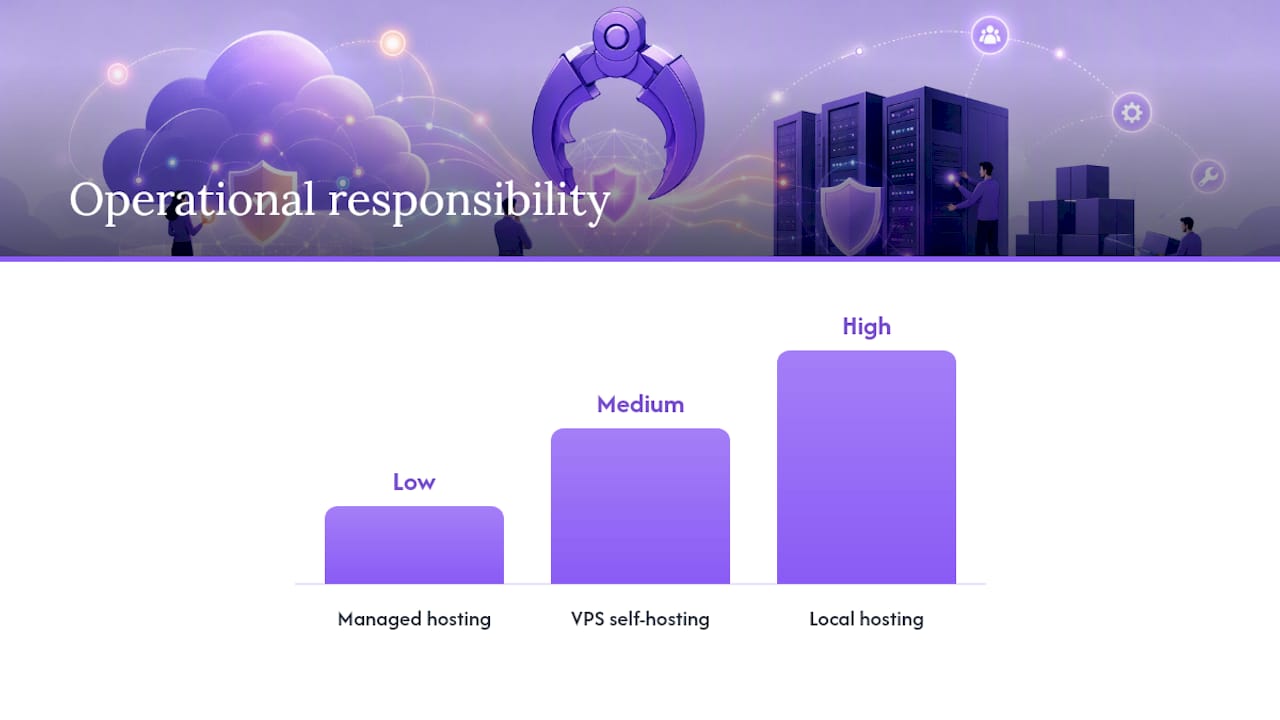
Managed hosting puts a provider between you and the server stack. You get a dedicated instance, automated patching, backups, and uptime guarantees, without touching a terminal.
VPS self-hosting means you rent a Linux box (DigitalOcean, Hetzner, Linode, whatever fits your budget) and run the Gateway yourself, following the official OpenClaw docs for network setup.
Local machine hosting runs OpenClaw on your own laptop or desktop. It works for prototyping and disappears the moment you close the lid or lose power.
- Managed hosting: low maintenance, strong security defaults, monthly cost, best for non-technical users and busy teams who want an agent that just works.
- VPS self-hosting: full control, custom networking, requires ongoing patching and monitoring, best for developers comfortable with Linux administration.
- Local hosting: zero cost beyond hardware, zero uptime guarantee, best for testing skills and workflows before committing to a server.
Quickstart install paths: Docker, systemd, and Kubernetes
The install method you pick determines how much babysitting the deployment needs later. Here's the fastest route for each.
- Docker Compose (recommended for production). Pull the official compose file, bind the Gateway port to
127.0.0.1rather than0.0.0.0, and keep the container security flags the maintainers ship by default, including capability drops andno-new-privileges, which meaningfully shrink the attack surface on a public host, according to Gamut's hosting guide. Pin the image tag to a specific release rather thanlatest. - Systemd / install script. Run
openclaw onboard --install-daemonto register the Gateway as a system service that survives reboots. The getting-started docs walk through setting environment variables for model routing and expose a Control UI on port 18789 once the daemon is verified as running. - Kubernetes. Deploy using the OpenClaw cloud-native manifests, which pull the default image from
ghcr.io/openclaw/openclaw:latestand set persistent volume claims for config and workspace directories separately. Choose aNodePortif you're tunneling through SSH or Tailscale, and only expose aLoadBalancerservice if you're fronting it with an authenticated reverse proxy.
Pinning image tags matters more than it sounds. Upstream OpenClaw ships frequent releases, and floating on latest means a routine docker compose pull can silently break your agent's tool integrations mid-shift.
Pro Tip: *Tag your Docker Compose file with the exact release version in a comment, and check the changelog before bumping it, not after something breaks.*
Security and hardening checklist for a public VPS
Roughly half of self-hosted OpenClaw operators skip at least one basic hardening step in their first deployment, usually the loopback binding, because the default quickstart doesn't force it. That single oversight is the difference between a private assistant and an open door.
Before you expose any OpenClaw endpoint to the internet, work through this list:
- Bind the Gateway to
127.0.0.1and reach it only through an SSH tunnel, a Tailscale network, or an authenticated reverse proxy running TLS. - Enforce gateway tokens on every client connection and rotate them on a fixed schedule, not "whenever you remember."
- Sandbox tool execution so a compromised skill can't touch the host filesystem or network directly.
- Lock SSH to key-only authentication, disable password login, and restrict inbound CIDRs to your known IP ranges.
- Enable firewall rules (ufw or cloud security groups) that deny everything except the ports you explicitly need.
- Set LLM API budget caps so a runaway loop can't drain your account overnight.
- Run
openclaw security auditafter any configuration change, not just at initial setup.
Cloud security fundamentals like these aren't unique to OpenClaw. A partner resource on cloud security best practices covers the same principles for any exposed service, worth a read if this is your first production VPS.
How much server do you actually need?
Undersizing the host is the most common reason self-hosted OpenClaw feels sluggish or crashes under load. Browser automation tasks in particular are memory-hungry, since each headless browser instance can eat several hundred megabytes on its own.
- Minimum: 1 vCPU, 2GB RAM. Fine for text-only tasks and light Telegram/Discord integrations, but expect swapping under any browser automation.
- Recommended: 2 vCPU, 4GB RAM. Comfortable headroom for concurrent tool calls and one or two browser sessions.
- Add a 2 to 4GB swap file on any VM under 4GB RAM. It won't fix a CPU bottleneck, but it prevents an out-of-memory kill during a spike.
- On ARM hosts and minimal VMs, set
NODE_COMPILE_CACHEandOPENCLAW_NO_RESPAWN=1to cut restart overhead, a trick worth knowing since it avoids repeated build steps that otherwise trigger memory pressure on small instances, per OpenClaw's own VPS documentation. - Free-tier ARM instances (Oracle Cloud, AWS Graviton) work but trade raw CPU speed for lower cost. They're stable for light workloads, not ideal if you're running heavy multi-agent tasks.
When to offload work to cloud workers
Not every task belongs on your primary Gateway. OpenClaw's cloud-workers pattern, covering both worker-turn and Codex-style remote-exec placement, lets you keep session state on the Gateway while shipping the actual compute to a disposable cloud node, according to the OpenClaw cloud workers documentation.
The distinction matters operationally. Worker-turn placement hands off a single conversational turn for heavy processing; remote-exec placement is built for longer-running code execution tasks that would otherwise pin your Gateway's CPU for minutes at a time.
- Use ephemeral cloud workers (a Crabbox-style pattern) when a task needs a burst of compute you don't want sized into your always-on box.
- Expect a short boot delay, typically seconds rather than minutes, since these nodes spin up fresh each time.
- Session state and credentials stay on the Gateway, so a compromised or crashed worker never exposes your persistent memory.
- Reach for this pattern once your baseline VPS starts showing sustained CPU pressure rather than provisioning a bigger box you'll rarely fully use.
Maintenance, backups, and what things actually cost
Self-hosting OpenClaw isn't "set it and forget it." Plan for roughly one to two hours a month of actual maintenance work: reviewing logs, applying updates, and checking that backups completed successfully.
- Back up both the Gateway state and the workspace directory on a daily cadence, minimum.
- Encrypt every backup at rest, and actually test a restore quarterly. An untested backup is a guess, not a safety net.
- Budget realistically: VPS hosting typically runs $5 to $24 a month, with LLM API usage adding another $10 to $60 a month depending on model choice and volume. Initial setup takes one to four hours even for an experienced operator.
- Watch for two recurring failure modes: out-of-memory kills from undersized RAM, and runaway agent loops that burn through API budget in hours instead of days.
- Mitigate both with hard budget caps on LLM spend and alerting tied to memory thresholds, not just uptime pings.
Pro Tip: *Set a hard dollar ceiling on your LLM provider's dashboard before your first production run. It's the cheapest insurance policy you'll ever buy against a misbehaving agent loop.*
For a deeper walkthrough of backup rotation and restore testing, ClawBase's OpenClaw backup playbook covers the encryption and scheduling details in more depth.
Monitoring and logging setup for OpenClaw hosting
You can't fix what you can't see, and OpenClaw's log output alone won't tell you a host is degrading until it's already down. Set up structured monitoring from day one, not after the first incident.
At minimum, track four signals: CPU and memory utilization, Gateway process uptime, LLM API spend against your budget cap, and error rates in tool execution logs. A simple approach works for most self-hosted setups: pipe systemd journal logs to a rotating file, tail them with a lightweight tool like journalctl -f during active debugging, and set up a cron job that checks the Gateway's health endpoint every few minutes and alerts you (via email, Telegram, or a webhook) if it stops responding.
For anything beyond a single-node deployment, consider a proper metrics stack. Prometheus paired with Grafana gives you dashboards for resource trends over time, which matters when you're trying to spot a slow memory leak before it becomes a 3 a.m. out-of-memory crash. Log aggregation tools like Loki or even a simple centralized syslog setup save you from SSHing into three different boxes to piece together what happened during an outage.
The Kubernetes path has an advantage here: liveness and readiness probes defined in your deployment manifest let the cluster restart a stuck pod automatically, which is one less alert you need to respond to manually at odd hours. If you're running the systemd install instead, pair it with a basic uptime monitor (UptimeRobot, Healthchecks.io) pointed at the Control UI port so you get an outside-in view of availability, not just an inside-out one.
Scaling strategies once one server isn't enough
A single VPS handles one Gateway well, but growth usually shows up as more concurrent users, more integrations, or heavier browser automation tasks running in parallel. When that happens, vertical scaling (a bigger instance) is almost always the first and cheapest move: bump RAM and CPU before you touch your architecture.
Horizontal scaling comes next, and it looks different for OpenClaw than for a typical web app. Since session state and persistent memory live on the Gateway, you can't simply spin up identical copies behind a load balancer the way you would with a stateless API. Instead, the practical pattern is to keep one Gateway as your state-holding core and lean on the cloud-workers pattern covered earlier to push heavy, stateless compute (browser automation, long-running code execution) onto ephemeral nodes. That keeps your core small and predictable while absorbing spikes elsewhere.

If you're running multiple isolated agents for different teams or clients, the cleaner scaling path is often running separate Gateway instances per tenant rather than forcing shared infrastructure, which avoids one team's runaway loop starving another's resources. Kubernetes makes this easier to manage at volume, since you can template a Gateway deployment and roll out new tenant instances from the same manifest with different PVC names and namespaces.
Load balancing genuinely helps once you're fronting a reverse proxy for multiple integrations (Telegram, Discord, Slack webhooks all hitting the same box). A proxy layer like Nginx or Traefik, terminating TLS and routing by path, keeps that traffic organized without requiring you to open multiple ports on the Gateway itself.
Data privacy and compliance when hosting OpenClaw
Where your data physically sits matters more than most first-time operators realize. If you're self-hosting, you choose the data center region, which gives you direct control over data residency, something that matters if you're subject to regional data protection requirements or handling anything sensitive through Telegram, Discord, or Slack integrations.
Persistent memory is the detail people underestimate. OpenClaw's memory management stores conversation history and workspace files that can include personal information, credentials, or business-sensitive content, depending on what you connect it to. Treat that storage with the same seriousness you'd apply to a customer database: encrypt it at rest, restrict filesystem access to the Gateway process alone, and include it in your backup encryption plan rather than treating it as disposable cache.
If you connect OpenClaw to business communication tools, check what those platforms' own terms allow for automated agents before wiring up integrations, since Telegram, Discord, and Slack each have their own bot policies. And if you operate in a regulated industry, self-hosting shifts compliance responsibility entirely onto you: you're the one who needs to document access controls, retention policies, and audit trails, not a vendor. Teams with specific compliance obligations often find that a managed hosting arrangement built for those requirements removes a meaningful chunk of that documentation burden.
Why managed hosting is the pragmatic default for most teams
Self-hosting OpenClaw is a legitimate choice, but the checklist above is the actual job, not a formality you skim once. Every item on it (loopback binding, token rotation, firewall rules, backup testing, budget caps) is ongoing work, and skipping any one of them is how a private assistant becomes an exposed liability.
Managed hosting removes patching, backup verification, and most of the security checklist from your plate entirely. That's not a lesser path. It's the correct trade for anyone whose priority is a working assistant, not a side project in Linux administration. Developers who want to tinker with Kubernetes manifests should self-host. Everyone else, including technical people who simply value their weekends, should let a managed provider carry that weight.
> *— Iosif Peterfi*
Get OpenClaw running today without touching a terminal

Plans start with an entry tier featuring a 7-day free trial, persistent memory management, and access to multiple AI models without requiring firewall configuration. Browse real OpenClaw use cases to see what an always-on agent can automate for your workflow, or head straight to the ClawBase landing page to start your trial and skip the VPS setup entirely.
Where to go next for official docs and setup guides
Start with the OpenClaw getting-started docs and VPS hosting guide. For Kubernetes, the cloud-native manifests repository and project source on GitHub cover configuration in more depth. New self-hosters can also follow ClawBase's 5-minute quickstart guide.
Sources
- Linux server — OpenClaw docs
- OpenClaw cloud workers — OpenClaw docs
- OpenClaw cloud-native Kubernetes manifests repo
- How to Self-Host OpenClaw on a VPS: Complete Guide (2026) — Use Apify