Secure OpenClaw Integrations for Teams and Developers Without a Server
2026-09-08
OpenClaw integrations connect the assistant to messaging channels, model providers, and external tools through one Gateway process. The reliable approach is a single master Gateway, channel plugins installed on demand through ClawHub, and hard security boundaries around remote access. If you'd rather skip the operations work, managed hosting through a provider like ClawBase gets you the same architecture without running a server yourself. This guide covers channels, SDKs, plugins, security rules, and a working setup checklist.
***
> TL;DR:
>
> - OpenClaw supports over 26 messaging channels, with most as install-on-demand plugins that update independently from core updates.
> - Telegram and WebChat are the fastest channels to test because they do not require third-party approval flows, unlike WhatsApp and Discord, which involve token management and expiration.
> - Routing model requests involves separate provider layers with built-in security practices, such as minimal permission tokens, environment storage, and fallback options.
> - Use the App SDK for remote message sending and task triggering outside the agent, and the Plugin SDK for in-process extensions requiring direct access to the runtime state.
> - Managed hosting through services like ClawBase simplifies deployment, ensures high uptime, and removes operational overhead while maintaining a unified, secure Gateway architecture.
***
Table of Contents
- What Chat Channels Does OpenClaw Support?
- How Do You Configure Model Providers and Routing?
- When Should You Use the App SDK vs. the Plugin SDK?
- How Does ClawHub Distribute Plugins and Skills?
- What Security Rules Apply to a Gateway?
- How Do You Set Up Telegram, WhatsApp, and Discord Quickly?
- Why a Single Master Gateway Changes How You Operate
- How ClawBase Runs Your Gateway Without the Ops Work
- Sources
What Chat Channels Does OpenClaw Support?
OpenClaw supports 26+ messaging channels as of mid-2026, and most of them ship as install-on-demand plugins rather than bundled code. That distinction matters for maintenance: a bundled channel updates with the core, while a plugin channel updates on its own release cycle through ClawHub, which means you control exactly when a channel's dependencies change.
Authentication varies by platform, and so does setup effort:
- Telegram: bot token from BotFather, ready in about two minutes, making it the fastest onboarding path for testing.
- WhatsApp: QR code pairing tied to a dedicated phone number.
- Discord: bot token generated through the Discord developer portal.
- Slack: app token plus bot scopes configured in the Slack app dashboard.
- Signal: phone number linking through the Signal protocol.
- iMessage: macOS-only, tied to an Apple ID on the host machine.
- WebChat: a direct Gateway URL, no external account needed.
- Matrix and Microsoft Teams: available as plugin installs rather than core channels.
Telegram and WebChat are the quickest to validate a new setup because neither depends on a third-party approval flow. WhatsApp and Discord take longer since you're managing tokens or QR sessions that expire and need periodic renewal, and both benefit from tight allowlists once live.
How Do You Configure Model Providers and Routing?
OpenClaw treats model choice as a separate layer from channels and execution. You set a primary provider, define fallbacks, and the routing layer resolves credentials through a shared resolver rather than hard-coding a key into every channel config.
Three practical rules keep this layer manageable:
- Store API keys in environment variables or a secrets manager, never inside a committed config file.
- Scope tokens to the minimum permission the provider allows, especially for hosted APIs billed per token.
- Set at least one fallback provider so a rate limit or outage on your primary doesn't stall every channel at once.
Local vs. hosted models: local inference keeps data on your hardware and avoids per-token costs, but you trade that for latency and the compute bill of running the model yourself. Hosted providers win on speed and model quality for most production use, particularly when you're serving multiple channels with real-time response expectations. OpenClaw's provider abstraction lets you mix both, running a local model for low-stakes tasks and routing higher-value requests to a hosted provider.
When Should You Use the App SDK vs. the Plugin SDK?
The choice comes down to where your code executes. Use @openclaw/sdk for anything running outside the OpenClaw process, and the Plugin SDK for code that runs inside it.
- @openclaw/sdk (App SDK): connects to the Gateway over an explicit URL and token, ideal for a dashboard, a mobile app, or a CI pipeline that needs to send messages or trigger tasks remotely.
- Plugin SDK: built for in-process extensions like a custom channel adapter or a tool that needs direct access to the agent's runtime state.
- REST endpoints:
POST /v1/chat/completionsfor standard chat requests,/hooks/:pathfor webhook-driven events, and/api/tools/invokefor triggering a specific tool call. All three expect a Bearer token scoped to the calling application.
A common pattern: a CI job calls /hooks/:path to trigger a task after a deployment, while a support dashboard uses the App SDK to send and receive messages from the same agent session. Mixing the two SDK types inside one codebase causes import errors and unnecessary bundle bloat, so pick one based on execution context and stay consistent.
How Does ClawHub Distribute Plugins and Skills?
ClawHub is the registry behind OpenClaw's install-on-demand model, and it's the reason the core stays small instead of bundling every possible channel and tool by default. You install only what you actually use, which keeps memory footprint predictable as your integration list grows.
Plugins and skills solve different problems. A plugin is typically an in-process adapter, something like a channel connector that needs deep runtime access. A skill is closer to a callable capability, often wrapping a CLI tool or an external API that the agent invokes on demand.
- Install a plugin, add the channel, then configure it, usually three commands in sequence.
- Example:
openclaw plugins install @openclaw/channel-telegram, followed byopenclaw channel add telegram. - Before installing a community skill, check the maintainer's recent commit activity and scan the manifest for anything requesting broad file or network access it doesn't need.
Pro Tip: *Skip skills with no updates in the last six months. Stale maintenance is the single most common source of broken auth flows after a platform API change.*
What Security Rules Apply to a Gateway?
Bind the Gateway to loopback by default. Public exposure of the default port 18789 risks leaking agent state and full session history to anyone who finds it. For remote access, use an SSH tunnel or Tailscale Serve rather than opening the port directly.
- Set a strong
gateway.auth.tokenor password, and never commit a config file that contains it. - Scope every token to the minimum access a given integration needs.
- Use
channels.whatsapp.allowFromto restrict which numbers can reach the agent at all. - Disable heartbeats on a new setup with
agents.defaults.heartbeat.every: "0m"until you trust the configuration, then check status and health before re-enabling. - Run
openclaw status,openclaw health, andopenclaw doctorregularly to catch drift before it becomes an outage.
Pro Tip: *A Gateway with no allowlist is an open inbox. Set allowFrom before you announce a new channel to anyone, not after.*
For a broader look at how encrypted messaging apps handle data in transit, Virtualship's analysis of encrypted chat apps is a useful comparison point when deciding how much you trust a given channel's transport layer.
How Do You Set Up Telegram, WhatsApp, and Discord Quickly?
Follow this sequence for any new channel, adjusting only the plugin name and channel-specific auth step.
- Start the Gateway:
openclaw gateway --port 18789. - Install the channel plugin:
openclaw plugins install @openclaw/channel-telegram(swap inchannel-whatsapporchannel-discordas needed). - Add the channel:
openclaw channel add telegram. - Authenticate: paste the bot token (Telegram/Discord) or scan the QR code (WhatsApp).
- Set allowlists and confirm with
openclaw status --deep.
A minimal config in ~/.openclaw/openclaw.json typically includes settings to restrict Gateway network exposure, control which numbers can message the agent, and disable background check-ins until trusted.
If a config change breaks a channel, revert the file and re-run openclaw health --json to isolate which setting caused the failure before touching anything else. For a full walkthrough of the initial onboarding flow, ClawBase's quickstart guide covers the same steps in more depth.
Why a Single Master Gateway Changes How You Operate
Running one master Gateway instead of several instances is the single biggest simplification available to anyone juggling multiple channels. Fragmented Gateways create session synchronization problems that show up as duplicate replies or lost context, and they're hard to diagnose after the fact.
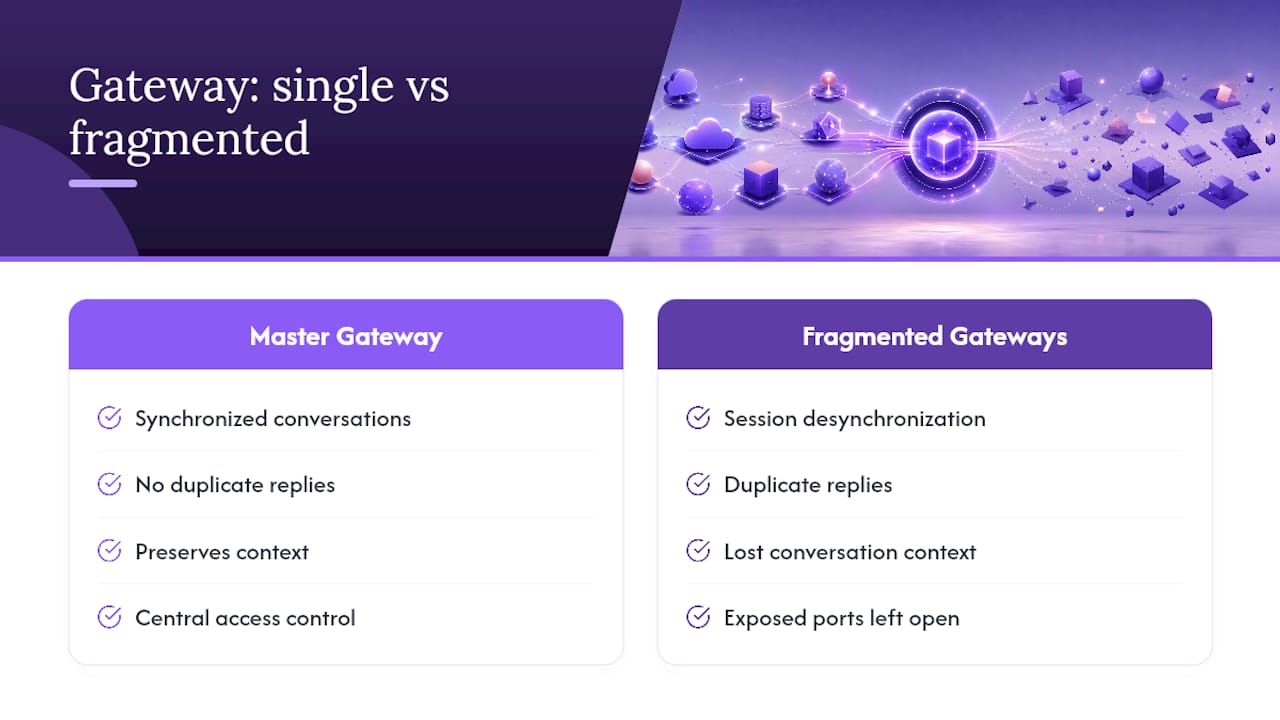
The recurring mistakes I see are consistent: exposed ports left open "just for testing," weak or reused Gateway tokens, and mixing App SDK and Plugin SDK code inside the same integration. Each one costs hours of debugging that a five-minute security pass would have prevented.
Managed hosting makes sense once you'd rather spend that time elsewhere. It keeps the same single-Gateway architecture and access controls, just without the server maintenance.
> *— Iosif Peterfi*
How ClawBase Runs Your Gateway Without the Ops Work
Managed hosting services provide the same single-Gateway setup recommended in this guide, deployed easily on dedicated, encrypted servers instead of machines you have to patch and monitor yourself.

That means persistent memory across sessions, connections to Telegram, Discord, Slack, and WhatsApp already wired up, and 99.9% uptime without you touching a config file. It suits developers seeking integrations without managing a VPS, as well as non-technical teams and professionals who want an always-on assistant that retains context between conversations.
If you've read this far because you want security and channel flexibility without owning the infrastructure, this kind of managed hosting service closes that gap. Browse real integration use cases to see what a managed agent handles day to day, then start a trial and have your first channel connected before the coffee gets cold.
Sources
- Channels & Integrations | OpenClaw Docs — Community Documentation for the Open-Source AI Agent
- Remote access — OpenClaw docs