OpenClaw Skill Marketplace: Command Driven Safety and Managed Hosting
2026-08-29

OpenClaw skills are versioned SKILL.md bundles discoverable on ClawHub, the platform's public registry. You search for a skill, check its trust signals, then install it with a single openclaw skills install command. Before running anything in production, verify the trust envelope or scan results first. Treat every third-party skill like a dependency you'd audit, not a plugin you'd blindly trust.
***
> TL;DR:
>
> - Use ClawHub as the primary source for trusted, versioned skills, and verify scan results and trust envelopes before installation.
> - Check the quality of a skill’s frontmatter, including description and homepage, to gauge maintenance and trustworthiness.
> - Pin skills to explicit semver versions and verify hashes after updates to prevent tampering or unvetted changes.
> - Prioritize testing all third-party skills in isolated environments before deploying to shared or production workspaces.
> - Consider managed hosting like ClawBase for automatic backups, seamless updates, and infrastructure management instead of self-hosting.
***
Table of Contents
- What Is the OpenClaw Skill Marketplace, Exactly?
- How Does a SKILL.md File Actually Work?
- How Do You Find and Vet a Skill Before Installing It?
- How Do You Install, Update, and Verify OpenClaw Skills?
- What Does It Take to Publish a Skill on ClawHub?
- When Should You Use a Plugin Marketplace Instead of ClawHub?
- What Guardrails Should You Put Around Community Skills?
- Where to Go for Official Documentation
- Managed Hosting vs. Self-Hosting for Marketplace Skills
- Get a Ready OpenClaw Runtime Without the Sysadmin Work
- Sources
What Is the OpenClaw Skill Marketplace, Exactly?
The term "openclaw skill marketplace" gets used loosely, but the actual infrastructure behind it is more precise than the phrase suggests. There's a canonical registry, a set of bundled defaults, and a loose constellation of community lists that surround it. Understanding which is which saves you from treating a GitHub gist the same way you'd treat a signed release.
ClawHub is the authoritative public registry. It's where skills get published, versioned, and indexed for search. Every skill listed there is public, versioned with semver, and discoverable through search that surfaces stars, comments, and download counts, which functions a lot like npm's registry model if you've worked with Node packages before. You search, you inspect the metadata, you install a pinned version.
Alongside ClawHub, OpenClaw ships with bundled skills, the defaults that come baked into the runtime. These aren't things you discover; they're already there, occupying the lowest tier of the loading hierarchy (more on that in the installation section). Then there are managed and workspace skills, which live closer to your actual deployment and take precedence over anything bundled or pulled from the registry.
Outside the official system, you'll run into community indexes. Repositories like awesome-openclaw-skills catalog thousands of entries and can be genuinely useful for discovery. But indexing isn't vetting. A list that aggregates GitHub stars tells you what's popular, not what's safe. Think of these indexes the way you'd think of a "best of" roundup blog for browser extensions: helpful for surfacing options, useless for confirming any of them are trustworthy.
Here's how the three surfaces differ in practice:
- ClawHub: authoritative, versioned, scanned, searchable by tags and semantic query. This is your primary discovery and install source.
- Bundled skills: pre-installed, lowest precedence, meant as sane defaults rather than a marketplace at all.
- Community indexes: unofficial aggregators, useful for finding niche or experimental skills that haven't been published to ClawHub yet, but carrying zero built-in trust guarantee.
The practical takeaway: default to ClawHub for anything you plan to run against real data or real workflows. Use community indexes the way you'd use a forum thread, as a lead worth following up on, not a source you cite as ground truth. A skill mentioned in an awesome-list with 400 stars might be exactly what you need. It might also be an abandoned fork nobody's touched in two years. The list won't tell you which.
How Does a SKILL.md File Actually Work?
Every OpenClaw skill boils down to a single markdown file with structured metadata on top. That simplicity is the whole point. A skill isn't compiled code you're trusting blindly; it's an instruction bundle a human (or another model) can read top to bottom in under a minute.
The anatomy breaks down into two layers. First, a YAML frontmatter block at the top of the file, and second, the markdown body that contains the actual instructions the agent follows. Skills are markdown instruction bundles with YAML frontmatter, where the metadata.openclaw field controls gating and eligibility, which is the part most tutorials skip past too quickly.
Here's what the frontmatter typically carries:
name: the skill's identifier, used in install commands and ClawHub search results.description: a one or two sentence summary that shows up in search listings and heavily influences whether anyone finds the skill at all.homepage: an optional link back to a repo or docs page, useful for trust signals and support.metadata.openclaw: a nested object that controls runtime behavior, including gating rules and eligibility conditions.
That last field is where things get interesting. Inside metadata.openclaw, you'll typically find a requires array, listing dependencies or environment conditions the skill needs before it'll load, and a skillKey, which acts as a unique namespace identifier to prevent collisions with other skills claiming a similar name. This is also where environment injection gets defined. If a skill needs access to an API key or a specific runtime variable, that requirement gets declared here rather than buried in the instruction body where a reviewer might miss it.
Why does any of this matter if you're just installing skills, not writing them? Because sloppy frontmatter is itself a warning sign. A skill listing with a vague one-line description, no homepage, and an empty metadata.openclaw block is telling you something about how much care went into the rest of it. Frontmatter quality correlates with maintenance quality more often than not.
There's also a discoverability angle that publishers underestimate constantly. Compact, clear frontmatter, meaning a specific name, a description that actually explains the use case, and a working homepage link, materially improves a skill's ranking and click-through on ClawHub search. Skills with generic names like "helper" or "utils" get buried under dozens of similarly named competitors. Specificity wins.
Pro Tip: *Before installing anything with a requires field you don't recognize, run openclaw skills verify first. It'll print the declared requirements and gating rules without executing anything, so you can catch a skill demanding broad filesystem access before it ever touches your workspace.*
How Do You Find and Vet a Skill Before Installing It?
Finding a skill is the easy part. Knowing whether to trust it is where most people skip steps they'll regret later. Here's an ordered approach that catches problems before they become incidents.
- Search with intent, not just keywords. ClawHub supports owner-qualified references (
@owner/slug), tag filters, and semantic search, so a query like "pdf summarization" will surface conceptually related skills even if they don't use that exact phrase in the title. The CLI mirrors this withopenclaw skills search "term" --limit 20, letting you cap results instead of scrolling an unbounded list. - Check the scan status before anything else. Every listing on ClawHub carries a scan indicator. A skill that hasn't been scanned, or one flagged with warnings, deserves a second look before you go further.
- Confirm the SHA-256 hash matches the published release. ClawHub's scan and verify pipeline, combined with pinned-version workflows, substantially reduces the risk of tampered or malicious releases reaching your workspace, but that protection only works if you actually check the hash rather than assuming the pipeline caught everything.
- Look for the
clawhub.skill.verify.v1trust envelope. This is the structured attestation ClawHub attaches to verified releases. Its presence means the skill passed the registry's automated checks; its absence isn't necessarily damning, but it does mean you're relying on manual review instead. - Read the social-proof signals critically. Stars, comments, and a recent "last updated" timestamp all matter, but weigh them together. A skill with 300 stars and no updates in fourteen months is a different risk profile than one with 40 stars updated last week.
- Pin to a specific semver release, never to a moving branch reference, unless you have a specific reason to track head.
- Review the permission surface and dependency list the way you'd review a pull request: what does this skill actually touch, and does that match what its description claims?
- Test in an isolated workspace before promoting to anything shared or managed.
That sequence matters more than any individual step. Skipping straight to installation because a skill has a high star count is the single most common mistake people make, and it's the one most easily avoided by just running verify first.
By the numbers: stars and comment counts function as lagging indicators, not real-time trust signals. A skill can accumulate stars from an initial launch spike and then go unmaintained for a year while the count keeps climbing on GitHub mirrors. The last-updated timestamp is the more honest number to check first.
The dependency review step deserves one more sentence: a skill that requires network access to an unfamiliar domain, or that requests broad filesystem read/write instead of a scoped directory, is asking for more trust than most use cases warrant. Match the permission ask to the job the skill claims to do.
How Do You Install, Update, and Verify OpenClaw Skills?
Once you've picked a skill, the installation commands follow a consistent shape regardless of source. The CLI accepts several reference formats, which matters because not every skill you want lives on ClawHub.
The core install patterns look like this:
openclaw skills install @owner/slugpulls directly from ClawHub using the owner-qualified reference.openclaw skills install git:owner/repo@refinstalls from a specific Git reference, useful for skills that haven't been published to the registry yet or for pinning to an exact commit.openclaw skills install ./path --as custom-nameinstalls a local skill from disk, letting you alias it under a name of your choosing.openclaw skills install skills-sh:owner/repo/slugtargets a shorthand community source format some contributors use for lightweight distribution.
Update behavior differs depending on where the skill originated, and this trips people up constantly. Running openclaw skills update only tracks and refreshes skills installed from ClawHub itself; skills installed via Git or local path require re-cloning or reinstalling manually to pick up changes. If you've pinned a Git-sourced skill and expect update to quietly pull the latest commit, it won't, and that's by design rather than a bug.
Verification runs through openclaw skills verify , which checks the installed skill's hash against its published trust envelope. Add --card to preview the declared requirements without executing anything. Use openclaw skills list to audit everything currently installed across your loading roots, and append --global to any install command when you want a skill available across every workspace rather than scoped to one project.
Loading precedence and where skills actually live
Skills don't all load from the same place, and when two skills share a name, precedence determines which one wins. OpenClaw resolves skills from six possible roots, in strict order, with each higher tier overriding a same-named skill from a lower one:
| Precedence | Location | Typical use |
|---|---|---|
| 1 (highest) | Workspace | Skills scoped to the current project folder |
| 2 | Project agent | Skills tied to a specific agent configuration within a project |
| 3 | Personal | Skills installed for your individual user account |
| 4 | Managed/local | Skills pushed by an admin or managed hosting layer |
| 5 | Bundled | Default skills shipped with OpenClaw itself |
| 6 (lowest) | Extra directories | Custom paths you've explicitly added to the load path |
This table explains a confusing failure mode: you install a skill globally, expecting it everywhere, but a workspace-level skill with the same skillKey silently overrides it. If a skill isn't behaving the way you expect, check openclaw skills list --verbose for the resolved path before assuming the install failed.
A few operational habits worth adopting immediately:
- Pin every production skill to an explicit version rather than a floating tag.
- Use
--force-installsparingly, since it's designed to override a conflict you've already investigated, not as a default flag to bypass errors. - Re-run
verifyafter any update, not just on first install, since a compromised update is a more common attack vector than a compromised initial release. - Keep workspace-level installs for anything experimental, and reserve managed or personal tiers for skills you've already vetted.
What Does It Take to Publish a Skill on ClawHub?
Publishing flips the perspective: instead of vetting someone else's work, you're the one whose metadata and versioning discipline other people will judge before trusting your release.
The prerequisites start before you write a single line of instruction content. You need owner scope on ClawHub, meaning your account or organization has publishing rights under a specific namespace, and your SKILL.md needs complete frontmatter: a real name, a description that actually distinguishes your skill from the dozen similar ones already listed, and a working homepage link back to source or documentation. Publishing requires owner scope, semver tagging, and the core metadata fields, and the registry maintains a full version history for every published skill to support auditing and rollback.
Semver isn't optional decoration here. Bumping a major version signals a breaking change to gating logic or required environment variables; a minor bump signals new capability without breaking existing installs; a patch signals a fix. Get this wrong and you'll break every pinned install downstream the moment someone runs an update.
The publish flow itself runs through clawhub package publish, which packages your SKILL.md and any supporting files, validates the frontmatter, and pushes the release under your owner scope. ClawHub then runs its scan pipeline automatically and generates the clawhub.skill.verify.v1 trust envelope for the release if it passes.
A responsible publishing checklist looks like this:
- Write a changelog entry for every version bump, even patch releases, since a version history with no notes is nearly as unhelpful as no history at all.
- Tag releases consistently with semver, and never reuse a version number after publishing it.
- Keep
metadata.openclawrequirements accurate; a skill that silently expands its permission ask in a patch release erodes trust fast once someone notices. - Respond to security reports quickly, since an unpatched vulnerability in a widely installed skill affects everyone who pinned an older version too late to catch the fix.
- Keep dependencies current and re-scan after any dependency bump, not just after changes to your own instruction content.
Maintenance is where most published skills quietly fail their users. A skill published once and never revisited accumulates staleness the same way any unmaintained dependency does. If you're not prepared to respond to issues or update for compatibility changes, consider that before publishing at all, or at minimum mark the skill clearly as unmaintained in its description.
When Should You Use a Plugin Marketplace Instead of ClawHub?
Skills and plugins solve related but distinct problems, and mixing them up leads to the wrong install source at the wrong time.
A skill is an instruction bundle: markdown text the agent reads and follows, with no executable code of its own. A plugin is different in kind. Plugins can ship both skills and full plugin manifests, and marketplace feed profiles support shorthand like plugin@marketplace for installation from curated feeds. A plugin is runtime code, capable of adding new tool integrations, channel connections, or capabilities the base agent doesn't have natively.
That distinction dictates where you should be looking:
- Use ClawHub when you want the agent to follow a new procedure, workflow, or domain-specific instruction set. Pure skill discovery belongs here.
- Use a plugin marketplace when you need new runtime capability entirely, like a fresh Telegram integration, a new tool the agent can call, or a channel connector that doesn't exist yet.
- Curated feeds vs. raw sources: marketplace feeds are curated and typically pre-scanned, while installing directly from a Git or npm source bypasses that curation layer entirely, shifting the vetting burden fully onto you.
The --marketplace flag on relevant install commands lets you target a specific curated feed rather than the default. If you're building something that spans both categories, say a plugin that adds a new integration and ships a companion skill describing how to use it, expect to manage both a plugin install and a skill install as separate steps, even though they arrived together conceptually.
For a deeper look at OpenClaw's plugin architecture and the security tradeoffs involved in extending an agent this way, a third-party breakdown of OpenClaw's design is worth reading before you commit to a plugin-heavy setup.
What Guardrails Should You Put Around Community Skills?
Running third-party instruction bundles against your own workspace, files, or credentials calls for the same discipline you'd apply to any dependency with write access to production systems.
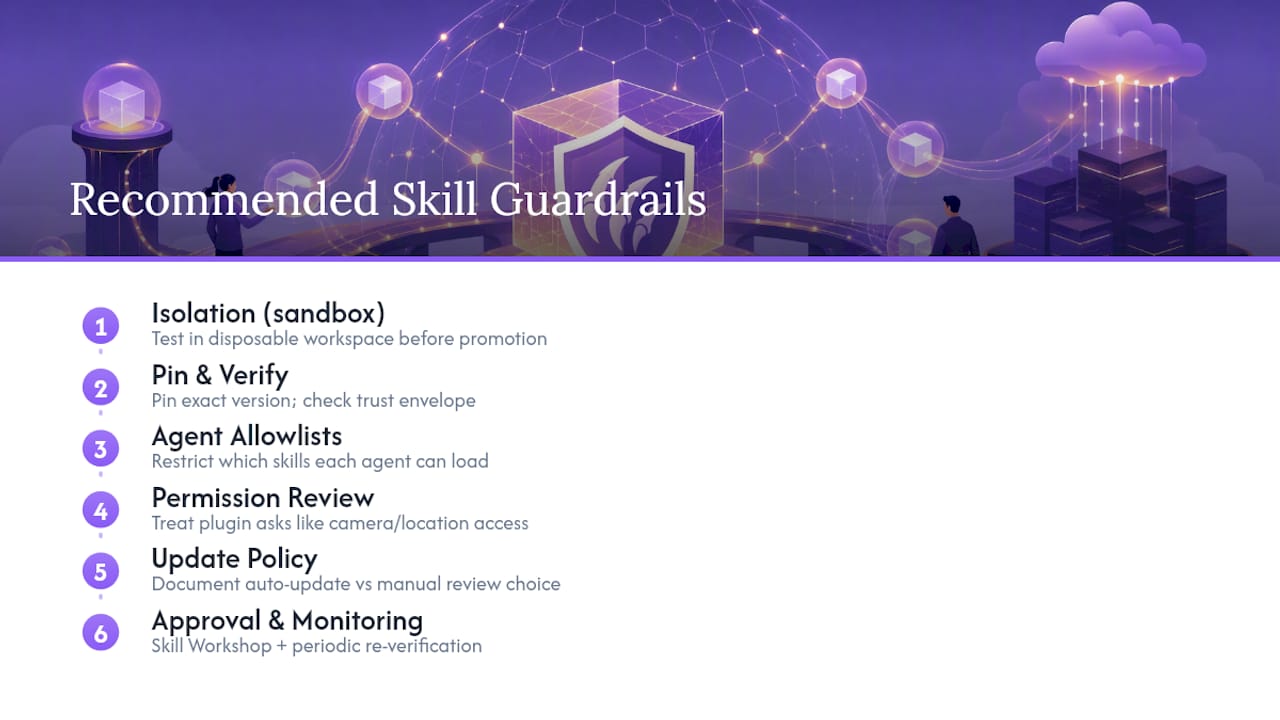
Start with isolation. Test every new skill in a disposable workspace before promoting it anywhere shared. A disciplined workflow, test in an isolated workspace, pin the exact version, verify the trust envelope, then promote to managed or shared tiers, prevents the kind of production incidents that come from trusting community content too quickly. Skipping the sandbox step to save five minutes is how a bad skill ends up touching real data.
Pair that with agent allowlists. Restrict which skills a given agent instance is permitted to load, rather than allowing open access to anything installed anywhere on the system. Plugin permission requests should be reviewed the same way you'd review an app requesting camera or location access: does the ask match the stated purpose? Environment injection, meaning any skill that pulls API keys, tokens, or secrets into its runtime context, deserves particularly close review, since a poorly scoped skill can leak credentials it never needed in the first place.
Set an explicit update policy rather than leaving it ad hoc. Decide whether your team auto-updates pinned skills on a schedule or requires manual review of every version bump, and write that decision down somewhere your team can reference.
Pro Tip: *If you're running OpenClaw across a team rather than solo, set up an internal approval step, sometimes called a Skill Workshop process, where someone reviews a skill's verify --card output and permission surface before it gets promoted to the managed tier everyone shares. It adds friction, but it's the friction that catches the skill nobody else checked.*
Monitoring matters as much as the initial vetting. A skill that behaved fine at install time can still ship a malicious update six months later. Re-verify periodically, not just once.
Where to Go for Official Documentation
For anything beyond this handbook, go straight to primary sources rather than secondhand summaries.
- OpenClaw's official skills documentation covers registry mechanics and search behavior in full.
- The ClawHub skill format reference details every frontmatter field.
- ClawHub itself is where you'll actually browse and publish.
- awesome-openclaw-skills remains a solid community supplement.
- ClawBase's blog covers hosting-side tutorials for teams running skills in production.
Managed Hosting vs. Self-Hosting for Marketplace Skills
Running skills reliably comes down to who's responsible for uptime, backups, and the boring maintenance work nobody enjoys. Managed hosting takes that operational weight off your plate, which matters more than people expect once they're running several skills against real workflows instead of a test workspace. Persistent memory and consistent uptime aren't nice extras when an agent is actually doing scheduled work for you.

Self-hosting still makes sense if you need direct repo-level control, want to modify the runtime itself, or you're the kind of person who finds satisfaction in owning every layer of the stack. Both paths use the same registry and the same commands described above.
If you're weighing which fits your situation, look honestly at how much time you want to spend on sysadmin work versus building or evaluating skills. That's usually the deciding factor, more than any technical constraint.
> *— Iosif Peterfi*
Get a Ready OpenClaw Runtime Without the Sysadmin Work
Everything covered above, verifying trust envelopes, managing loading precedence, pinning versions, testing in sandboxes, assumes you're comfortable running your own server and keeping it patched. Clawbase removes that layer entirely.

Clawbase gives you access to more than 50 AI models with multi-model routing, plus direct connections to Telegram, Discord, Slack, and WhatsApp, so a skill you install works across the channels you already use for work. Backups run daily and automatically, updates apply without you touching a terminal, and private skillset support means your team's internal skills stay scoped to your own deployment rather than mixing with public ClawHub traffic.
If your priority is spending time evaluating and using skills rather than managing infrastructure, start with the ClawBase pricing and quickstart page, or browse real use cases to see what a managed deployment looks like in practice before committing.